
Navigating the fast-paced world of real estate requires efficient data management and extraction. Real estate agents often grapple with challenges when handling data from Redfin, a go-to platform for property listings and inquiries. These issues can slow down lead management and delay closing deals. Luckily, Parserr offers a robust solution to streamline and automate data extraction, allowing agents to focus on their core strength—selling properties. In this post, we’ll explore the top three challenges that real estate agents face with Redfin data extraction and how Parserr can solve them.
Challenge 1: Incomplete or Overlooked Information in Redfin Emails

Description
As a real estate agent, you know that sometimes important details can be overlooked or missed when scanning through your Redfin emails. Critical data such as customer contact information, property specifics, or buyer requests can easily slip through the cracks. This can result in missed opportunities and slow response times. This doesn’t look good for you or the buyer.
Solution
Parserr’s powerful email parsing capabilities ensure that no important details are overlooked. Our system uses customizable extraction rules that are easy to set up and tailored to your specific needs. Parsing rules are the instructions Parserr follows to extract data from your emails. Each rule matches a field you want to capture, like how each column in an Excel spreadsheet corresponds to a different piece of data.
With these rules in place, Parserr can automatically capture and extract all key data from incoming emails, such as property features, buyer’s preferences, and notes. This ensures you have all the information you need to follow up effectively. With our advanced AI extraction capabilities, you can trust that no vital information will be missed, enabling you to respond quickly and efficiently to every opportunity.
Example: Imagine you receive multiple emails a day from Redfin about potential buyers. Parserr can automatically extract crucial details from each one of those emails, such as the buyer’s name, email address, phone number, the property they are interested in, and their request notes.
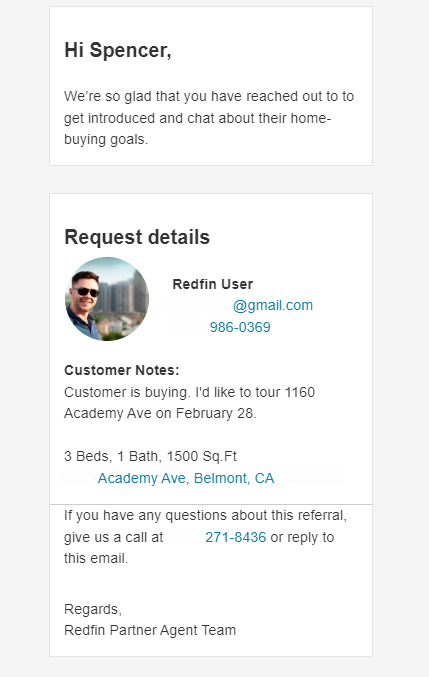
For an email like the one above, Parserr will capture details such as:
- Buyer name
- Phone
- Property address
- Property Details: 3 Beds, 1 Bath, 1500 Sq. Ft
- Customer Notes: “I’d like to tour 1160 Academy Ave on February 28.”
With Parserr, every key detail is automatically extracted, ensuring you and your team have all the information you need at your fingertips, ready for immediate follow-up.
Challenge 2: Integrating Redfin Data with CRM Systems and other 3rd party systems

Description
Seamlessly integrating data from Redfin emails into your CRM systems can be both complex and time-consuming. Manually entering this data is not only tedious but also prone to errors. This inefficient process can consume a significant amount of your time—time that could be better spent engaging with clients and closing deals.
Solution
Our system ensures that data from Redfin emails is automatically and correctly formatted for your CRM, eliminating the need for manual adjustments and preventing data silos. Parserr can automatically extract and enter data into our direct integrations (or so-called Data Destinations), including SFTP, SharePoint, Google Sheets, Salesforce, Dynamics 360, Webhook, and HubSpot. If your CRM or system is not listed here, worry not! We support custom integrations through Power Automate and Zapier, which act as connectors to over 6,000 apps, ensuring that Redfin data is smoothly integrated into any CRM system. Parserr saves you valuable time and minimizes the risk of errors. This seamless integration allows you to manage your leads effectively and focus on more important activities, like interacting with clients and showcasing properties.
Example: You use Salesforce as your CRM and want to try Parserr but aren’t sure how to connect both systems. Follow this simple step-by-step process, and you’ll be receiving leads in Salesforce in no time!
- Set up your Parserr account and send a sample email (an email we use as a reference).
- Create an email parsing rule.
- Connect Parserr to your Salesforce account via the Integration settings page in Parserr.
- Map the extracted data fields to the corresponding fields in Salesforce.
- Save and test the integration to ensure data flows seamlessly from Redfin emails to your CRM.
Set and Forget
Once the setup is complete, you won’t have to worry about manual data entry or integration issues ever again!
Our automated system will continuously extract and transfer data from your emails to your CRM seamlessly. This allows you to focus on what you do best—engaging with clients and closing deals—while we ensure your data is always up-to-date and accurately integrated.
Conclusion
Managing data from Redfin can be challenging, but with the right tools, it doesn’t have to be. Parserr addresses the top challenges real estate agents face, from missing critical information and time-consuming manual data entry to ensuring data accuracy and managing high volumes of inquiries.
Ready to transform your data extraction process? Try Parserr today and experience the benefits firsthand.
Additional Resources